Atmospheric worlds you can explore in your browser: particles, light and sound
Some pages ask you to read. These ask you to stay for a while. This guide groups a set of atmospheric worlds by mood, from cosmic clouds and dark water to sound and moving particles, says what each one does when you move, hold and let go, points to a few other places on the web with a similar quality, and answers the questions people tend to ask before they start.
If you are looking for atmospheric interactive worlds in the browser, places made of particles, light and sound that you can open now and simply spend time in, this is a short map. Every world below runs in a browser tab with nothing to install and no account, and each answers the same three gestures in its own way: move, hold and let go.
The guide is grouped by mood rather than by technique. If you want to know why some web pages feel like places at all, What makes a website immersive? covers that question. If you want a broader list of playful and surprising sites, Cool interactive websites worth getting lost in gathers sixteen of them. Here the aim is narrower: worlds with depth and a slower pace.
What makes a browser world feel atmospheric?
An atmospheric world is one where the setting matters more than the task. There is no score and no finish line. The space has its own motion before you touch it, it changes in response to you, and it keeps changing a little after you stop. Darkness, depth and gradual change do most of the work.
Three questions help when you open one: does it move on its own, does a slow gesture differ from a fast one, and does it remember you after you let go?
Cosmic atmospheres: clouds of light and stars
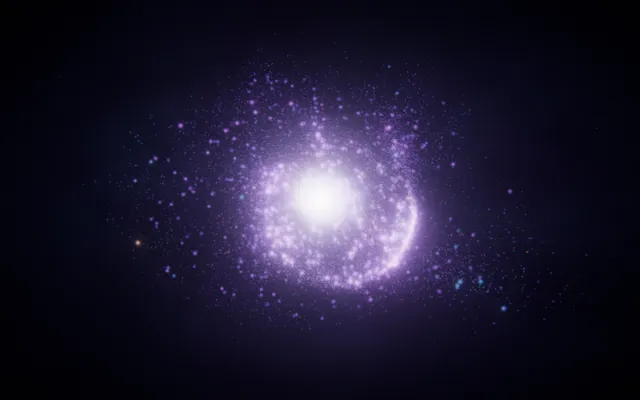
Nebula. The world Synfield opens on is a cloud of light you can gather. Its page describes "a field of points, violet and deep, arranged in layers rather than a flat picture." Move the pointer to stir the cloud; hold the button to gather a singularity; the wheel, or the up and down keys, opens the cloud or draws it in. On a touch screen you slide a finger to stir and rest it in one place to gather. Let go, and the cloud bursts outwards. With sound on, a low chord carries a breath that opens as you move, and holding adds a low tone.
Constellation. Constellation is "stars linked by travelling light." Its page is clear that it "is not a chart of a familiar sky" but a network of clusters and thin bridges. Move the pointer and nearby stars lean towards it. Hold the button on a star to light it and drag to carry the chain; the pulse keeps jumping after you let go. With sound on, each star you light plays a note, and more notes follow as the pulse jumps along the chain.
Eclipse. Eclipse is summed up in six words: "Move the shadow. Reveal the light." A dark circle rests against a field of light, with a pale corona at its edge. Moving the pointer shifts the perspective and the depth; holding the button drags the shadow and lets the light through; releasing lets the shadow slowly realign. The wheel widens or gathers the corona. With sound on, a deep hum rises as light escapes past the edge.
Orbits. Orbits lets you make the sky yourself. Its description is "Planets you launch, singing as they pass." Hold to create a planet and draw its path, release to launch it, and stay still for a steady orbit. The wheel slows down or speeds up time. With sound on, a planet plays a note as it passes the top of its orbit.
Underwater and dreamlike spaces
Abyss. Abyss is a deep, almost lightless space where "creatures of light come close, flee and answer you." There is no floor and no horizon. Move slowly and the creatures draw close; move fast and they scatter. Hold the button to send a call of light through them, and release to let them disperse. With sound on, a low pressure and a deep hum fill the dark. Its page puts the effect well: "The longer you remain, the more the darkness begins to feel inhabited rather than empty."
Veil. Veil is "iridescent silk that ripples, stretches and rings." Moving the pointer guides ripples across the silk; holding draws the layers towards you; releasing sends a ripple back through them and the silk rings. The wheel separates or gathers the layers. With sound on, you hear the air of moving silk over a soft, held tone.
Breathe. Breathe is the gentlest of them all: "a light that widens and gathers, at a slow pace." You can follow the cycle with the wheel or the keys; hold the button to pause the breathing light and release to let it breathe again. With sound on, soft tones and a breath of air follow the cycle. It keeps its own time and does not use the microphone.
Worlds of sound: audiovisual and sound-reactive
Soundscape. Soundscape is "a night pond of sound that lives on its own. Touch it and it changes." Its page calls the surface "both a landscape and an instrument." Moving the pointer sends a wind across the water. Holding the button sows a presence of sound, or takes one and moves it; releasing lets it live on by itself. The wheel opens or gathers the space. With sound on, each presence has its own voice, depending on where you sow it: bells low down, then breath, then rain, and calls at the top.
Echo. Echo is built around a simple loop: "Your gestures come back to play with you." Hold and drag to draw with light, then release to finish the stroke. The wheel keeps the echoes or lets them fade. With sound on, holding places a note that comes back to you as an echo.
The ideas behind music that plays itself are covered in What is generative music?, and the link between sound and visible pattern in When sound becomes shape: what is cymatics?. Neither needs repeating here.
Particle and fluid environments
Vortex. Vortex is "spin that remembers the circles you draw." Move the pointer and the funnel leans with you. Hold the button near the centre to catch it, draw circles, and release to let it coast. The wheel opens the funnel or narrows it. With sound on, a wind rises with the spin.
Several other Synfield worlds belong to this family, and they already have their own Stories. Liquid Light, a luminous surface with a memory for touch, appears in the essay on immersive websites; Matter and Nebula are the examples in What is a particle system in digital art?; and a living network of filaments is the subject of Mycelium in digital art.
Other atmospheric places on the web
A few pieces by other people share this quality. None of them appears in the Cool interactive websites list.
- Afterlight describes itself as "a playable universe of light and sound." You hold and drag a field of particles, choose between three worlds called Nebula, Bloom and Tidal, and can turn on an ambient synth whose notes follow your gestures. Its page says that everything runs in your browser, with no accounts.
- Tendrils, by Eoghan O'Keeffe, is interactive visuals for Max Cooper's music, part of his Emergence project. Its notes explain that each particle leaves a trace of its velocity in a shared field that then moves other particles, and that the camera and microphone can feed the motion if you allow them.
- WebGL Fluid Simulation, by Pavel Dobryakov, is a fluid you stir with your pointer or finger. Its repository sums it up as "play with fluids in your browser (works even on mobile)."
- Slow Roads is a very different kind of atmosphere: an endless drive that describes itself in three words, "endless driving zen."
How to enjoy atmospheric interactive worlds in the browser
A few habits help.
Give each one a minute before you touch it. Most of them move on their own. Watching first tells you what your gesture will change.
Try the same gesture slowly and quickly. In Abyss the difference decides whether the creatures come or go; in Eclipse a small movement near the edge of the shadow changes the whole corona.
Hold, then let go. The release is often where the world answers most clearly: the wave and the ring in Veil, the spin that carries on in Vortex.
Make the room darker and the window larger. Dark worlds read better on a dim screen with nothing else around them; your browser's full-screen mode helps.
Turn the sound on. In every world sound starts off. Turn it on with the sound button or the S key; it stops when you switch tabs. Headphones help, especially in Soundscape.
Use the settings if motion is too much. Press P for settings for light, glow, trails, reduced motion, pausing idle movement and volume, as the guide lists them.
Hands are optional. Every world here can be explored fully with a mouse, a touch screen or a keyboard. The camera is only for an optional hands mode, and the guide says it "stays off until you ask for it." How hand tracking works in the browser explains what happens when you do.
Frequently asked questions
Do I need to install anything?
No. Synfield's About page says it "runs in your browser. Nothing to install, no sign-up, and no account."
Do these worlds work on a phone?
Each world's official instructions include touch gestures alongside mouse and keyboard ones.
Do I need a VR headset?
No. Synfield's About page says it "does not need special equipment."
Do I need a camera or microphone?
No. The camera is only for an optional hands mode, and no world uses the microphone.
Is there sound?
Yes, in all ten worlds here. Sound starts off; turn it on with the sound button or the S key. Headphones help.
Are they free?
Yes. There is no sign-up or account, and the site's structured data marks it as free to access.
If you only open one, start with Nebula: move once, hold once, let go, and watch the cloud find its shape again.