About Abyss
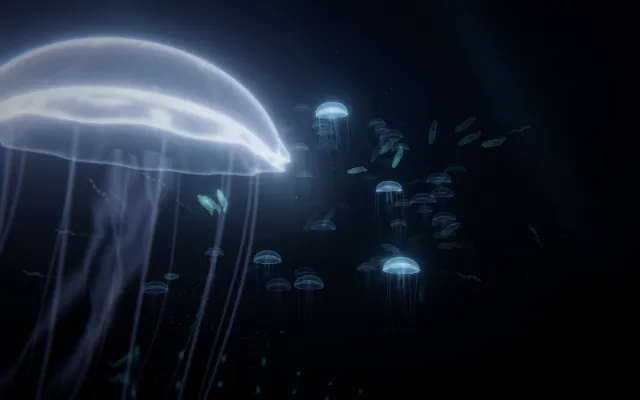
In a deep, almost lightless space, small luminous creatures move through the darkness.
Some appear far away, little more than passing points. Others come closer, revealing soft bodies of light and subtle changes in colour.
There is no visible floor or horizon, only the suggestion of a vast volume extending beyond what you can see. Abyss is a world of drifting forms, darkness and distant glimmers, where the smallest movement can suddenly become the centre of attention.
What happens when you stay
The creatures are not simply decorations in the distance.
They notice your presence and respond in different ways. Some approach with curiosity, while others retreat or move around you.
Their movements create brief encounters that do not always repeat. Stay still and watch the space develop its own rhythm, with forms appearing and disappearing at different depths.
Then move towards one and see whether it comes closer or escapes. The longer you remain, the more the darkness begins to feel inhabited rather than empty.
Where it comes from
The deep ocean is one of Earth’s least illuminated environments.
Below the reach of sunlight, many organisms produce their own light through bioluminescence, a chemical process found in creatures such as jellyfish, comb jellies and certain deep-sea fish. Light can help them attract prey, communicate, camouflage themselves or defend against predators.
Abyss takes inspiration from this extraordinary ecology, especially the contrast between near-total darkness and isolated sources of living light. Its creatures are imagined rather than representations of actual species.
The world explores a different question: what happens when light behaves less like an object and more like another living presence?
Things to try
- Stay still and let the creatures approach.
- Move towards a distant light.
- Follow one creature without trying to catch it.
- Notice which forms retreat and which remain nearby.
How to explore Abyss
You can explore with a mouse, a touch screen or your own hands.
Mouse and keyboard
- Move the pointermove slowly to draw them close; fast movement sends them away.
- Hold the mouse buttonsend a call of light through the creatures.
- Release the buttonlet the creatures disperse.
- Use the wheel or ↑ ↓make a calm light or disperse them into darkness.
Touch
- Move a finger on the scenemove slowly to draw them close; fast movement sends them away.
- Keep a finger still for a momentsend a call of light through the creatures.
- Lift your fingerlet the creatures disperse.
- Spread two fingers or bring them togethermake a calm light or disperse them into darkness.
Hands, with the camera
- Point with your index fingermove slowly to draw them close; fast movement sends them away.
- Bring thumb and index together and holdsend a call of light through the creatures.
- Separate thumb and indexlet the creatures disperse.
- Open your palm or close your fistmake a calm light or disperse them into darkness.
A mouse, touch or keyboard is enough. Choosing “Hands” here only shows instructions; it never turns on the camera.