Cool interactive websites worth getting lost in
Some websites want you to read. These want you to do something, and they turn a small action, a drag, a key, a held cursor, into something you could not have predicted. This guide sorts sixteen of them by the kind of experience they offer, so you can pick one by mood rather than by chance.
If you only open one site from this guide, choose it by what you feel like doing:
- Make something: Silk, which turns any stroke into a symmetrical drawing.
- Make sound: Blob Opera, a quartet of singing blobs you conduct with one finger.
- Look out at the world: Radio Garden, live radio from almost anywhere, chosen by turning a globe.
- Go on a journey: The Deep Sea, one long scroll to the bottom of the ocean.
- Think while you play: The Evolution of Trust, half an hour of game theory you learn by playing it.
The rest of the guide explains what makes each of the sixteen worth a visit, what to try first, and what to know before you start: which device works best, what needs sound, and the one or two places where something costs money or asks you to share.
Five kinds of interactive website
"Interactive" covers very different experiences. A drawing toy and a scrolling documentary are both interactive, but they ask for different things, and judging them by the same standard is unfair to both. This guide sorts the sixteen sites into five kinds.
- Open play. No goal, no path. You act and the site turns your action into something richer: a drawing, a landscape, a drive. You decide when it is finished.
- Instruments. Built to make music or sound. They work best when you stop testing them and start playing, and most reward a second session more than the first.
- Windows onto the world. The material is real: radio stations, people's windows, today's wind. Your role is to choose where to look, and the pleasure is in what you find.
- Journeys. A path designed by someone else, which you travel at your own pace by scrolling or falling. Interaction here is light, closer to turning pages than to playing, and the craft is in the pacing.
- Experiments and games of ideas. Each is built around one question: can a machine read a doodle, why does trust survive, what happens if you hold still. You play to find the answer.
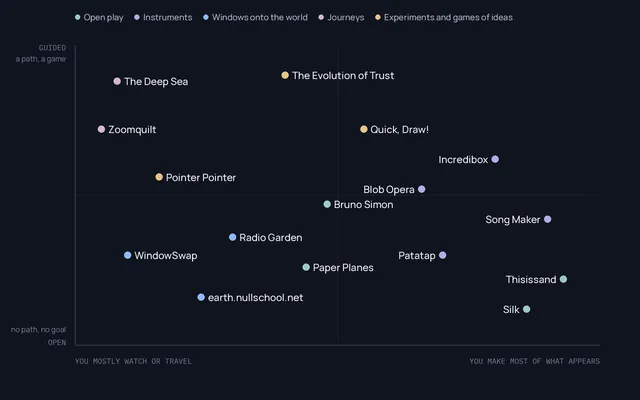
None of these kinds is better than another. A journey can move you more than an instrument, and a two-minute joke can stay with you longer than a half-hour simulation. The point of the sorting is to set the right expectation before you click.
The sixteen at a glance
Every site was opened in a desktop browser on 31 October 2026. Fifteen loaded normally. The Deep Sea answered our automated browser with a bot-protection check, so its description relies on published coverage rather than on that visit.
| Site | Kind | What you do | Best on | Cost or account |
|---|---|---|---|---|
| Silk | Open play | Draw strokes that are mirrored and woven | Mouse or touch | Free, no account |
| Thisissand | Open play | Pour coloured sand into piles | Touch or mouse | Free in the browser; optional app |
| Bruno Simon's portfolio | Open play | Drive a toy car around a 3D island | Keyboard, capable computer | Free |
| Paper Planes | Open play | Throw and catch planes with strangers | Phone | Free |
| Patatap | Instrument | Press keys to trigger sound and shapes | Keyboard, or touch | Free |
| Blob Opera | Instrument | Drag singers to change pitch and vowel | Mouse or touch | Free |
| Chrome Music Lab: Song Maker | Instrument | Compose a loop on a grid | Any | Free, no account |
| Incredibox | Instrument | Dress beatboxers to build a track | Mouse or touch | Free web demo; paid app |
| Radio Garden | Window | Turn a globe to tune live radio | Any, with sound | Free |
| WindowSwap | Window | Open someone else's window | Any | Free; optional paid tier |
| earth.nullschool.net | Window | Read live wind and ocean on a globe | Larger screen | Free |
| The Deep Sea | Journey | Scroll from the surface to the ocean floor | Any | Free |
| Zoomquilt | Journey | Fall into an endless painting | Larger screen | Free |
| Quick, Draw! | Experiment | Doodle while a neural network guesses | Mouse or touch | Free; drawings join a public dataset |
| The Evolution of Trust | Experiment | Play rounds of a classic trust game | Any | Free |
| Pointer Pointer | Experiment | Hold the cursor still and get pointed at | Mouse or trackpad | Free |
Open play: start anywhere, stop whenever
Silk
Silk was made by Yuri Vishnevsky, with music and sound by Mat Jarvis, and has been online since around 2010. You drag across a dark canvas and a soft strand of light follows, mirrored and repeated around the centre. Even a careless gesture comes back fine and symmetrical, which makes it one of the few drawing tools where nobody feels they "can't draw".
What makes it more than a screensaver is its controls. You can change how many times the stroke repeats around the centre, turn the mirror on or off, make strokes spiral inwards, and drag colours together to blend them. Each setting changes the rule your gesture passes through, so the same movement gives very different drawings.
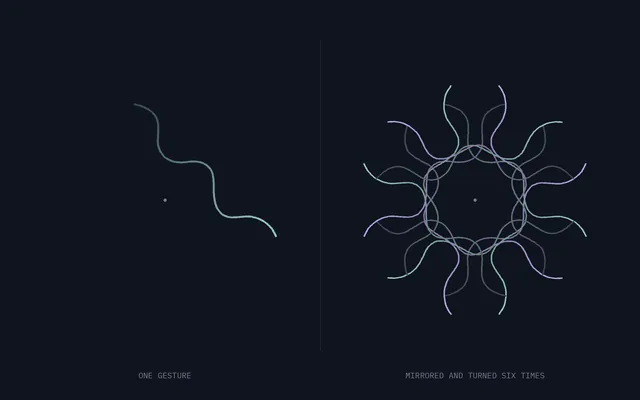
Try first: draw one slow line from the centre outwards, then the same line fast. Then switch off the mirror and draw again. Best for: anyone who wants to make something beautiful in a minute, and children. By Yuri Vishnevsky · Open Silk
Thisissand
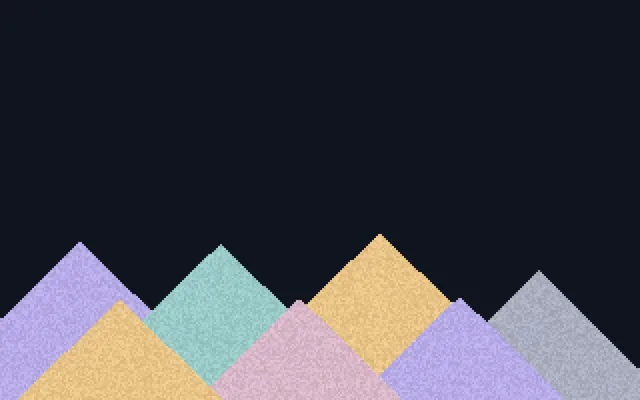
Thisissand has one gesture: press, and sand pours from that point and piles up. Change the colour as you go and the layers build into something like the cross-section of a hillside. The pleasure is in the physics: grains slide until the slope can hold them, so every pile settles into a similar angle, and your choices show up as strata.
The site also has a gallery of recent and popular sandscapes, an optional auto-flow that keeps the sand pouring (double tap the canvas), and an app with profiles for those who want to keep their work. None of that is needed to play.
Try first: pick two colours only and alternate them in thin layers. Best on: a touch screen, where pouring with a finger feels more physical. Best for: slow, absorbed attention. Open Thisissand
Bruno Simon's portfolio
Bruno Simon's portfolio is a website you drive. The developer's projects sit on a small 3D island, and you visit them in a toy car steered with the keyboard. The first version, from 2019, was built with the 3D library Three.js and the physics library Cannon.js and was named Site of the Year 2020 by Awwwards. It has been rebuilt since.
It belongs here because it shows how far a browser can go: real-time 3D, physics and sound, with no installation. That also means it asks more of your computer than anything else in this guide, so an older laptop or phone may struggle.
Try first: ignore the projects for a minute and just drive around the island. Best for: anyone curious about what web developers can build. Open the portfolio
Paper Planes
Paper Planes, by the studio Active Theory, launched in 2016. On a desktop it asks you to join on your phone, and that is the point: from the phone you throw a plane into a shared sky and catch planes thrown by strangers in other places. It is one of the rare interactive websites about other people rather than about you.
Try first: catch a plane before you throw one, and look at where it came from. Best on: a phone. Open Paper Planes
Instruments: things you play
Patatap
Patatap, by Jono Brandel with sounds by the duo Lullatone, calls itself a portable animation and sound kit. Each key from A to Z, and the space bar, plays a short sound and throws a coloured shape across the screen; on a phone, a tap does the same. Within a minute you are playing rhythms, and the animations make each sound visible, so the screen becomes a record of the beat.
The page warns that it contains flashing images. Take that seriously if flashing light affects you.
Try first: pick three keys and play only those, as a drummer would. Best on: a keyboard, with speakers on. By Jono Brandel with Lullatone · Open Patatap
Blob Opera
Blob Opera, by David Li with Google Arts & Culture (2020), puts four round singers on a stage. Drag one up or down and it changes pitch; move it and its vowel changes; the other three harmonise in real time. The voices are not recordings stitched together. They come from a machine-learning model trained on about sixteen hours of singing by four opera singers, Christian Joel, Frederick Tong, Joanna Gamble and Olivia Doutney, so what you hear is the model's idea of their voices following your hand.
Try first: move only the bass, very slowly, and listen to how the others reorganise around it. Best for: people who think they are not musical. Open Blob Opera
Chrome Music Lab: Song Maker
Chrome Music Lab is a set of browser experiments from Google about how music works. Its centre is Song Maker, a grid where each column is a moment in time and each row a note: click squares and a loop plays them, left to right. You can change the instrument and the tempo, and save the song to share it.
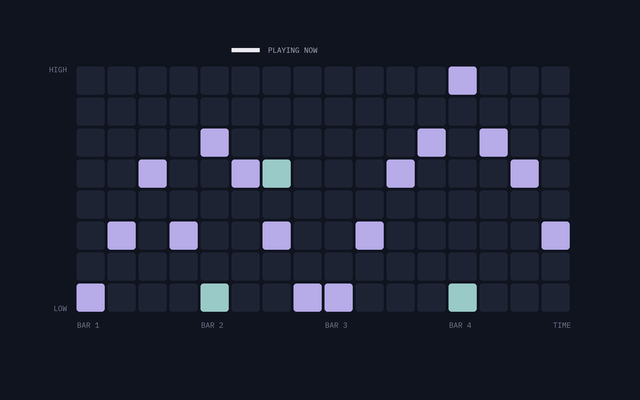
This kind of grid, a step sequencer, is how a great deal of electronic music has been written, and Song Maker is the gentlest introduction to it: the shape of a melody is visible at a glance.
Try first: light one square per column to draw a melody, then add a single low note every four columns. Best for: beginners and classrooms. Open Song Maker
Incredibox
Incredibox was made by the French studio So Far So Good and went online in 2009. You drag icons onto a row of beatboxers, and each one starts to perform a part; combine the right parts and you unlock animated sequences. Saved mixes get a link, and other players can listen and vote.
The website offers a free demo with a selection of its musical styles; the complete collection is in a paid app. The demo is enough to understand why it has lasted: it turns arranging a song into placing characters on a stage, so layering, the core skill of production, becomes something you can see.
Try first: add performers one at a time and remove the first one when the fourth comes in. Best for: children and anyone who likes to tinker with arrangements. By So Far So Good · Open Incredibox
Windows onto the world
Radio Garden
Radio Garden was created by Studio Puckey (Jonathan Puckey) with Moniker in Amsterdam, as a project of the Netherlands Institute for Sound and Vision, and launched in December 2016. You turn a globe covered in points of light; each point is a live radio station, and stopping on one plays it. Browsers usually need one click on play before sound starts.
What makes it special is that it turns geography into listening. Spin from a city to its neighbour and the language, the music and the time of day change under your hand.
Try first: stop on a city whose language you do not speak, then move a few hundred kilometres and compare. Best with: headphones. Open Radio Garden
WindowSwap
WindowSwap began during the 2020 lockdowns, when Sonali Ranjit and Vaishnav Balasubramaniam, a couple working in advertising in Singapore, wanted to look out of someone else's window. Press a button and you get a view from somewhere in the world, filmed by the person who lives there: a clip of several minutes, not a live feed, submitted by visitors and screened before it appears.
The random window is free. A paid tier, All-Access, adds the full archive, bookmarks, playlists and a back button. You can also submit your own window.
Try first: leave one window playing in the background for a few minutes, with the sound on. Best for: a pause. By Sonali Ranjit and Vaishnav Balasubramaniam · Open WindowSwap
earth.nullschool.net
earth.nullschool.net, by Cameron Beccario, is an animated globe of current conditions. Moving lines trace the wind; other layers show ocean currents, air quality and more. According to the project's notes, the weather comes from supercomputer forecasts refreshed every three hours and the ocean data daily, and the code is published on GitHub.
You drag the globe, zoom and switch layers from a small menu. It is a data visualisation, but because the wind is drawn as moving particles, it reads like a living painting.
Try first: find the next storm on the map and follow its wind. Best on: a large screen. Open earth.nullschool.net
Journeys: scroll, or fall
The Deep Sea
The Deep Sea, published in 2019 by Neal Agarwal on his site neal.fun, is one long scroll from the surface to the bottom of the Challenger Deep, close to eleven kilometres down. A depth counter keeps track as you descend and the animals change with the zone, so scrolling, the most ordinary gesture on the web, becomes a sense of distance.
Your interaction is minimal and that is fine: the craft is in the pacing, in how long the dark stretches between animals are. The rest of neal.fun is worth an afternoon. As noted above, this description relies on published coverage, because the site blocked our automated check.
Try first: scroll at a steady pace, without skipping, until the light disappears. Best for: curious children and adults alike. By Neal Agarwal · Open The Deep Sea
Zoomquilt
Zoomquilt, started by Nikolaus Baumgarten in 2004, is a collaborative, infinitely zooming painting. More than a dozen illustrators each painted a scene that hides the next one inside it, so the image falls endlessly inwards and the last scene leads back to the first.
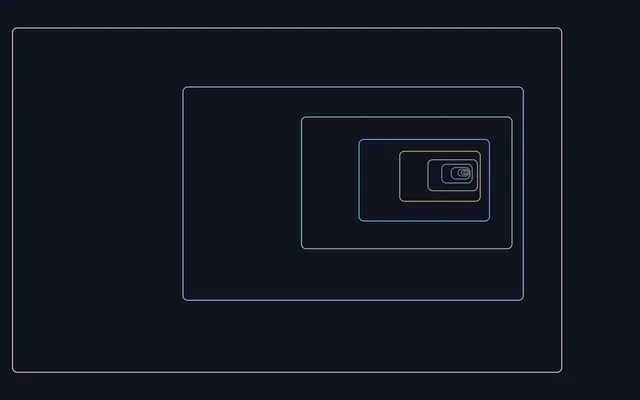
It predates almost everything else in this guide and is closer to animation than to play. It earns its place because the idea is carried through with such care that the loop never shows its seams.
Try first: watch one full loop without looking away. Best on: a large screen, full screen. Open Zoomquilt
Experiments and games of ideas
Quick, Draw!
Quick, Draw!, from Google Creative Lab, gives you a word and a few seconds to draw it, while a neural network tries to guess what you are drawing. It is a game, but also a demonstration of how a model learns from examples. The site says it openly: your drawings are added to a public dataset, the largest collection of doodles in the world, so draw knowing that.
Try first: after a round, open the dataset and look at a few hundred strangers' cats side by side. It is a small lesson in how differently people picture the same thing. Open Quick, Draw!
The Evolution of Trust
The Evolution of Trust, by Nicky Case (July 2017), is an interactive guide to game theory that takes about thirty minutes. You play rounds of a simple trust game, a version of the Prisoner's Dilemma, against characters with different strategies, then run tournaments between whole populations of them. It draws on Robert Axelrod's The Evolution of Cooperation (1984). The interaction is the argument: you understand why cooperation can survive because you have just tried to survive without it.
It is available in many fan translations, including Spanish, French, German, Italian and Brazilian Portuguese, linked from its first page.
Try first: play the first rounds honestly, then betray once and watch what happens. Best for: students, teachers, and anyone who likes to understand how things work. By Nicky Case · Open The Evolution of Trust
Pointer Pointer
Pointer Pointer (2012), by the Amsterdam studio Moniker (Jonathan Puckey, Luna Maurer and Roel Wouters), has one rule: move your cursor, then hold it still. After a moment, a photograph appears of a real person pointing exactly at it. It needs a pointer that can rest without clicking, so a mouse or trackpad; on a touch screen there is nothing to hold still.
It lasts a minute and is still funny on the tenth try, because the archive of pointing people seems impossibly large. It is also a neat idea about attention: the site only responds when you stop.
Try first: put the cursor somewhere awkward, like a corner. Open Pointer Pointer
When the body is the controller
A smaller group of websites asks for more than a mouse: your arms, your face or your hands, through the camera. Two of the best known came from Google in 2018. Semi-Conductor let you conduct an orchestra by moving your arms in front of a webcam, and Move Mirror matched your pose to photographs of people in the same position. Both are now marked as no longer active, so they are not recommended here, but their pages still explain how they worked.
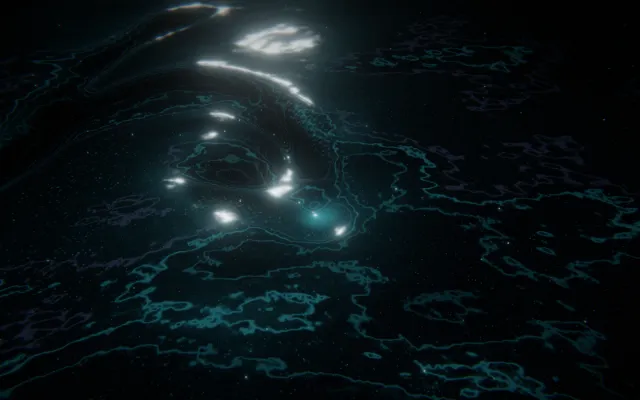
Synfield, the project these Stories belong to, is a current example. Its worlds respond to a mouse, a finger or, if you turn the camera on, your hands. In Liquid Light, a gesture leaves a wake that the surface remembers for a while.
Before you start
A few habits make any of these sites better.
- Read the one line of instructions. Most of these sites have exactly one, and it usually names the gesture the whole piece is built around.
- Decide about sound. Many are built around audio. Start at a low volume and raise it once you know what to expect.
- Change speed. Most reward a slow gesture as much as a fast one, and some, like Pointer Pointer, only respond when you stop.
- Change device. A piece that feels like a toy with a mouse can feel like an instrument on a touch screen. Paper Planes only really works on a phone.
- Check what you share. Quick, Draw! keeps your drawings in a public dataset; WindowSwap accepts your own window if you choose to submit one. Nothing else here needs an account.
What the best ones share
Look across the sixteen and a pattern appears. None asks you to learn an interface. Each is built around a single action, a drag, a key, a scroll, a held cursor, and spends its effort on what that action produces. The best also give you something you could not have made alone: a choir, a planet's weather, a stranger's view, a symmetry you would never draw by hand.
If you want the background to these experiences, what interactive art is traces the idea of a work that responds to its audience, from early kinetic pieces to the browser. If you are curious about why Silk or a flock of dots can produce something new every time, interactive generative art looks at the systems underneath.