What is interactive art? A guide to art that answers back
Most art asks you to look. Interactive art asks you to act, and then shows you what your action changed. This guide explains what that means and where its edges are, traces its history through the works that shaped it, and looks at how it is made and where to find it today.
Interactive art is art that changes in response to what its audience does. A visitor moves, touches, speaks, breathes or clicks, and the work responds: an image shifts, a sound begins, a room reorganises itself. The response is designed by the artist, but the particular result depends on who is there and what they do. In many interactive works, nothing much happens until someone takes part.
That is the short answer. The longer one is more interesting, because the boundaries are not sharp. Some works respond once, others hold a long conversation with you; some need a computer, many do not. This guide maps those differences, follows the idea through the works that shaped it, and ends with practical advice on how to experience it.
A working definition, and its edges
Most definitions of interactive art share three ingredients:
- Something is sensed. There is an input: a position in a room, a touch, a sound, a gesture, a click, a heartbeat.
- The work responds. The input changes what the work shows, plays or does, according to rules the artist designed.
- You perceive the change and can act again. A loop forms between you and the work, and you start to learn how it behaves.
These ingredients are present in different amounts, and it helps to think of interactivity as a range rather than a yes-or-no property. At one end, a light that switches on when you enter a room reacts to you. A projection that follows your silhouette responds continuously. A work you can learn to play, testing it and adjusting, is interactive in the full sense. And a work that only exists because several people shape it together is participatory.
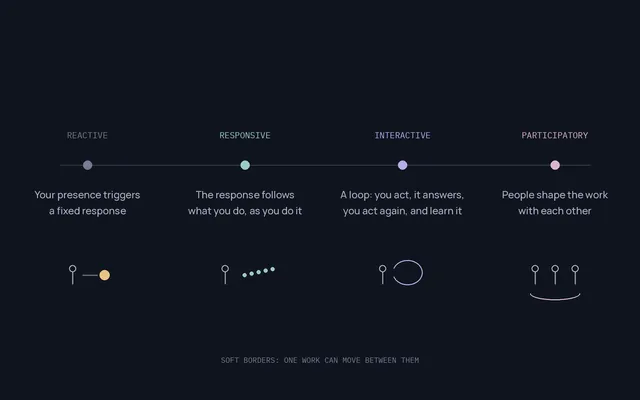
None of these positions is more artistic than another. Artists and theorists also draw the lines differently: some reserve "interactive" for works driven by computers, others include any work the audience physically changes. When you read a definition, including this one, treat it as a useful lens rather than a rule.
Interactive, digital, participatory, generative, immersive
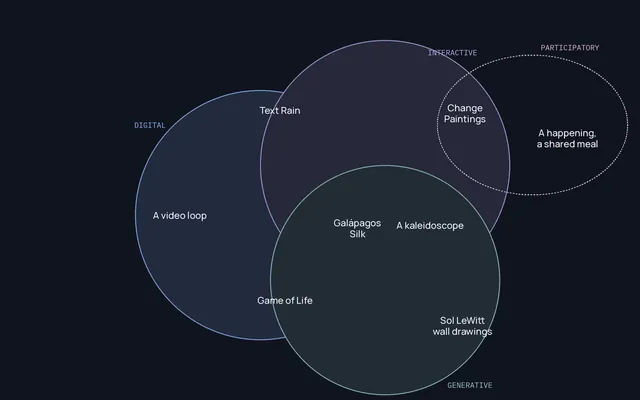
Several neighbouring terms are often used as if they meant the same thing. They describe different properties, and a single work can have several of them at once.
- Digital art is defined by its medium: it is made or shown with digital technology. A video loop on a screen is digital, and it plays the same way whether anyone is watching.
- Interactive art is defined by a relationship: the work changes in response to its audience. It can be digital or not. A set of panels that visitors slide into new arrangements is interactive with no electronics at all.
- Participatory art puts the audience's involvement at the centre, often socially: a shared meal, a collective action, a performance the public completes. It may involve no responsive technology.
- Generative art is defined by its process: it is produced by a system, a set of rules, a program, a machine, that runs with some autonomy. It does not need an audience to act. When it does respond to people, it becomes interactive generative art, which has its own guide.
- Immersive art surrounds you: a room, a projection that fills your field of view, a headset. It describes scale and enclosure, not response. Many immersive installations are interactive, but a film projected around you is immersive and not interactive.
- Interactive art in the browser is a place rather than a category: works that run in an ordinary web page, using the mouse, the touch screen and sometimes the camera. A selection of interactive websites shows how varied it can be.
| Term | What it describes | Can a work be this without a computer? | Example |
|---|---|---|---|
| Digital | The medium | No | A video loop on a screen |
| Interactive | A response to the audience | Yes | Roy Ascott's Change Paintings |
| Participatory | The audience's involvement, often social | Yes | A happening, a shared meal |
| Generative | A process that runs with some autonomy | Yes | Sol LeWitt's wall drawings, made from written instructions |
| Immersive | Being surrounded by the work | Yes | A room-sized installation |
| In the browser | Where the work runs | No | Silk, Blob Opera |
A short history, in ten works
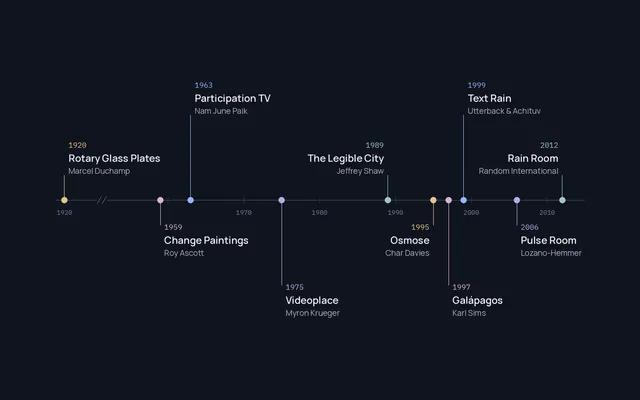
Interactive art did not begin with computers. It grew out of a long effort by artists to make the audience part of the work, and computers arrived as one powerful way to do it. The ten works below are not a complete history, but each marks a step that later artists built on.
1920: a work that depends on where you stand
Marcel Duchamp's Rotary Glass Plates (Precision Optics), made in 1920 and now in the Yale University Art Gallery, is a motorised construction of painted glass panels. When it spins, the separate lines resolve into concentric circles, but only from the right viewing position. It is not interactive in the modern sense, since the viewer changes nothing in the machine. It is often cited as a precursor because the image depends on the viewer's body and position.
1959: panels the viewer rearranges
From 1959, the British artist Roy Ascott made his Change Paintings: compositions on panels of painted Plexiglas that viewers could slide and reorder, so the work had no single final state. Ascott went on to become one of the most influential theorists of art and cybernetics, and these simple, physical works are often named as early interactive art, made without a single circuit.
1963: a television that listens
In March 1963 Nam June Paik, later called the founder of video art, opened his first solo exhibition, Exposition of Music – Electronic Television, in Wuppertal, Germany. Among its thirteen altered television sets was Participation TV. According to the Nam June Paik Art Center, which holds a 1998 version, its earliest form was purely acoustic; in the later version, sounds made into a microphone become shifting patterns of red, green and blue lines on the screen. The title says it all: television as something you act on, not only receive.
1975: the computer sees the body
Myron Krueger conceived Videoplace in 1969, tested its ideas in an exhibit called Metaplay in 1970, and showed a piece about a shared telecommunication space at the Milwaukee Art Museum in 1975, when work on the full system began. Cameras captured visitors' silhouettes and placed them, in real time, into a graphic world where they could interact with virtual objects and with people in another room. Krueger called this artificial reality, and his 1974 dissertation was published as the book Artificial Reality (1983). Every artwork that reads a body through a camera without asking you to wear anything descends from this idea.
1989: a city made of letters
In Jeffrey Shaw's The Legible City, made with Dirk Groeneveld in three versions between 1988 and 1991, a visitor rides a stationary bicycle through a city whose buildings are replaced by three-dimensional letters. Pedalling and steering move you through Manhattan, Amsterdam or Karlsruhe. In the Amsterdam and Karlsruhe versions the letters have the proportions and positions of the real buildings. The work is in the collection of the ZKM in Karlsruhe. It used the whole body as the interface at a time when computers were controlled by keyboards and joysticks.
1995: navigating by breath
Char Davies's Osmose (1995) is a virtual-reality installation in which the visitor, whom Davies calls an immersant, wears a headset and a vest that tracks breathing and balance. Breathing in makes you rise, breathing out makes you sink, and leaning moves you, through a dozen world-spaces based on nature: a clearing, a forest, a leaf, a cloud. It is both immersive and interactive, and it chose the slowest possible interface, the breath, at a time when virtual reality was associated with speed.
1997: visitors as evolution
In Karl Sims's Galápagos, installed at the ICC in Tokyo from 1997 to 2000, twelve screens showed abstract animated organisms. Visitors stood on sensors in front of the ones they found most interesting; those survived, mated and mutated, and the others were replaced by their offspring. It is interactive, generative and participatory at once: the audience steered an evolutionary process together.
1999: the body as material
In Camille Utterback and Romy Achituv's Text Rain (1999), visitors see their own mirrored image on a large projection while coloured letters fall around them. The letters land on anything dark enough, an arm or an umbrella, and fall again when it moves; the words come from Evan Zimroth's poem "Talk, You". The Smithsonian American Art Museum acquired the work in 2015. The same year, 1999, Daniel Rozin's Wooden Mirror used 830 motorised wooden tiles to reflect whoever stood in front of it, and a year earlier Scott Snibbe's Boundary Functions (1998) had projected lines on the floor that divided a room into each visitor's personal territory, responding only when at least two people were present.
2006: a room of heartbeats
Rafael Lozano-Hemmer's Pulse Room, first shown in 2006, fills a space with one to three hundred clear incandescent bulbs. A visitor holds a sensor; their heart rate makes the nearest bulb flash in rhythm, and each new participant pushes the previous recordings one bulb further along. The room becomes an archive of everyone who has touched it.
2012: rain that stops for you
Random International's Rain Room (2012) lets visitors walk through falling rain without getting wet: 3D tracking cameras detect bodies and stop the water directly above them. It opened at the Barbican in London in 2012 and travelled to MoMA (2013), the Yuz Museum in Shanghai (2015) and LACMA (2015–2017). According to the Sharjah Art Foundation, its first permanent installation is in Al Majarrah, Sharjah. Rain Room also showed the limits of the form: visitors who move too fast get wet, because the system needs a moment to see them.
Since then: the browser
Today's browsers can draw complex graphics, synthesise sound and, with permission, use the camera or the microphone. That has made the web one of the easiest places to meet interactive art: no ticket, no queue, open at any hour. Some pieces are small experiments, others are full works that reward repeated visits.
What changes when the audience acts
When a work responds to you, the experience changes in ways worth noticing.
- You become visible. In Text Rain or Videoplace your body is on the screen, and other visitors watch you play. Interactive art often turns spectators into performers, whether they intended to or not.
- The work is never seen whole. Each visit shows one path through a range of possibilities. Two people can describe the same work in very different ways, and both be right.
- Time matters. A painting can be taken in at a glance. An interactive work often needs a few minutes before its behaviour becomes clear.
- Other people change it. Many works behave differently with one visitor than with several. Boundary Functions does nothing at all for a single person.
- The questions change. Alongside "What does it mean?", you start asking "What is it listening to?" and "What happens if I do less?" Those questions are part of the work.
What interactive works can sense
The list has grown with technology, but the main families are stable.
| Input | What it captures | Example |
|---|---|---|
| Presence and position | Whether someone is there, where they stand | Boundary Functions, Rain Room |
| Touch and pressure | Contact with a surface or object | Change Paintings, touch screens |
| Movement and gesture | The body, the arms, the hands | Videoplace, Text Rain |
| Voice and sound | Pitch, volume, rhythm | Participation TV |
| Body signals | Breath, heartbeat, balance | Osmose, Pulse Room |
| Choices | Selections among options | Galápagos |
| Pointer | Mouse, trackpad, finger on a screen | Most works in the browser |
| Other people | Many visitors at once, sometimes far apart | Videoplace's shared space |
How it is made, in plain words
You do not need to know how a work functions to enjoy it, but a basic map explains why some feel instant and others sluggish.
Sensors
A sensor turns something physical into a number: distance, pressure, light, sound level. Installations often combine several. Small microcontroller boards make it straightforward to connect sensors to lights, motors and speakers, which is why so many contemporary installations are built by small studios.
Computer vision
Computer vision is software that extracts information from camera images. Videoplace separated a silhouette from the background; Text Rain looked for areas darker than a threshold. Today's models estimate the positions of a body's joints, or of the twenty-one points of a hand that Google's MediaPipe Hand Landmarker returns for each hand it detects, many times per second on ordinary hardware.
Speed
Interactive work has to respond quickly, ideally within a fraction of a second, or the loop between action and response breaks and the work feels dead. A great deal of the craft is invisible: making a response arrive in time.
Software
Artists use creative coding environments such as Processing and p5.js, game engines, sound environments, and in the browser the built-in graphics and audio interfaces, WebGL and the Web Audio API.
The browser and your camera
A modern browser can render three-dimensional scenes, play sound and, if you allow it, use the camera. A well-made piece asks for the camera only when you choose to use it and explains what happens to the video. In Synfield, for example, the camera is optional, the video is processed in your browser, and Synfield does not record it or send its frames to a server; its privacy page has the details.
In a gallery or in a browser
| Physical installation | In the browser | |
|---|---|---|
| Where | Museums, festivals, public space | Any computer or phone |
| Scale | Can fill a room and surround you | Fits a screen; sound through speakers or headphones |
| Senses | Touch, temperature, water, breath | Sight and sound; touch on phones; camera if allowed |
| Social | Often shared: others see you play | Usually private, sometimes networked |
| Access | A visit, often a ticket, often temporary | Any hour, from anywhere |
| Lifespan | Hard to preserve and to tour | Easy to share, fragile as browsers change |
Neither is a lesser form. Rain Room offers a physical intensity no screen can match, and it also needs a purpose-built space and a great deal of water. A browser work can be revisited at three in the morning and shared with a link, and may stop working when a browser changes. Preservation is a real issue for both: installations depend on hardware that ages, and browser works on software that changes.
How to experience interactive art
- Read the short instructions, then stop reading. Most works give one hint. The rest is meant to be discovered.
- Change one thing at a time. Move slowly, then fast. Stand still. Come closer. Watch what changes.
- Watch others first. In an installation, seeing how someone else plays often shows a possibility you would have missed.
- Give it a few minutes. Many works reveal their behaviour only after you stop trying to control them.
- Choose permissions deliberately. In a browser, allow the camera or microphone only when a piece needs it and says why.
Common questions
Is interactive art always digital?
No. It is defined by the relationship between the work and its audience, not by technology. Ascott's Change Paintings, many participatory performances and objects that the public rearranges are interactive without electronics. Digital technology made new kinds of response possible, especially through cameras and real-time graphics.
Is a video game interactive art?
Some games are made and received as art, and they are certainly interactive. Games usually have goals, rules for winning and a sense of progress; interactive artworks more often invite open-ended exploration. The boundary is blurry, and plenty of works sit on both sides of it.
Is generative art the same as interactive art?
No. Generative art is made by a system that runs with some autonomy, and it can run without anyone touching it. Interactive art responds to its audience. When a generative system also responds to people, the result is interactive generative art.
Is AI art interactive?
It depends on the work. An image produced by an AI generator and then shown as a print is not interactive for the people who look at it. Some interactive works use machine learning inside them, as Blob Opera does for its voices, and some artists build installations around models that respond to visitors. "AI" describes a technique; "interactive" describes a relationship with the audience.
Where can I see interactive art?
Media art centres such as the ZKM in Karlsruhe, festivals such as Ars Electronica in Linz, science and art museums, and the web. Many historical works are documented online with video when they are not on view; Text Rain, for instance, is listed by the Smithsonian as not currently on view.
Looking at the next one
The most useful thing to carry into your next encounter with an interactive work is a set of questions rather than a definition. What is it listening to? How quickly does it answer? Does it remember what I did? Does it behave differently when someone else arrives? What happens if I do less?
You will notice that the answers say as much about the work's ideas as any wall text. Krueger's silhouettes are about sharing a space at a distance; Davies's breathing interface is about slowing down; Lozano-Hemmer's bulbs are about the trace each person leaves. In interactive art, the way a work listens is often what it has to say.